Currency Converter
Currency Converter
This program takes one form of currency and converts into other form. The output value also changes depending on the current value in the market.
Prerequisites
Make sure you have the following installed
tkinter
forex-python
Pillow
To install them
sudo apt-get install python-tk [For installing tkinter in Linux]
pip3 install forex-python Pillow
To run this script
python Currency.py
DEMO
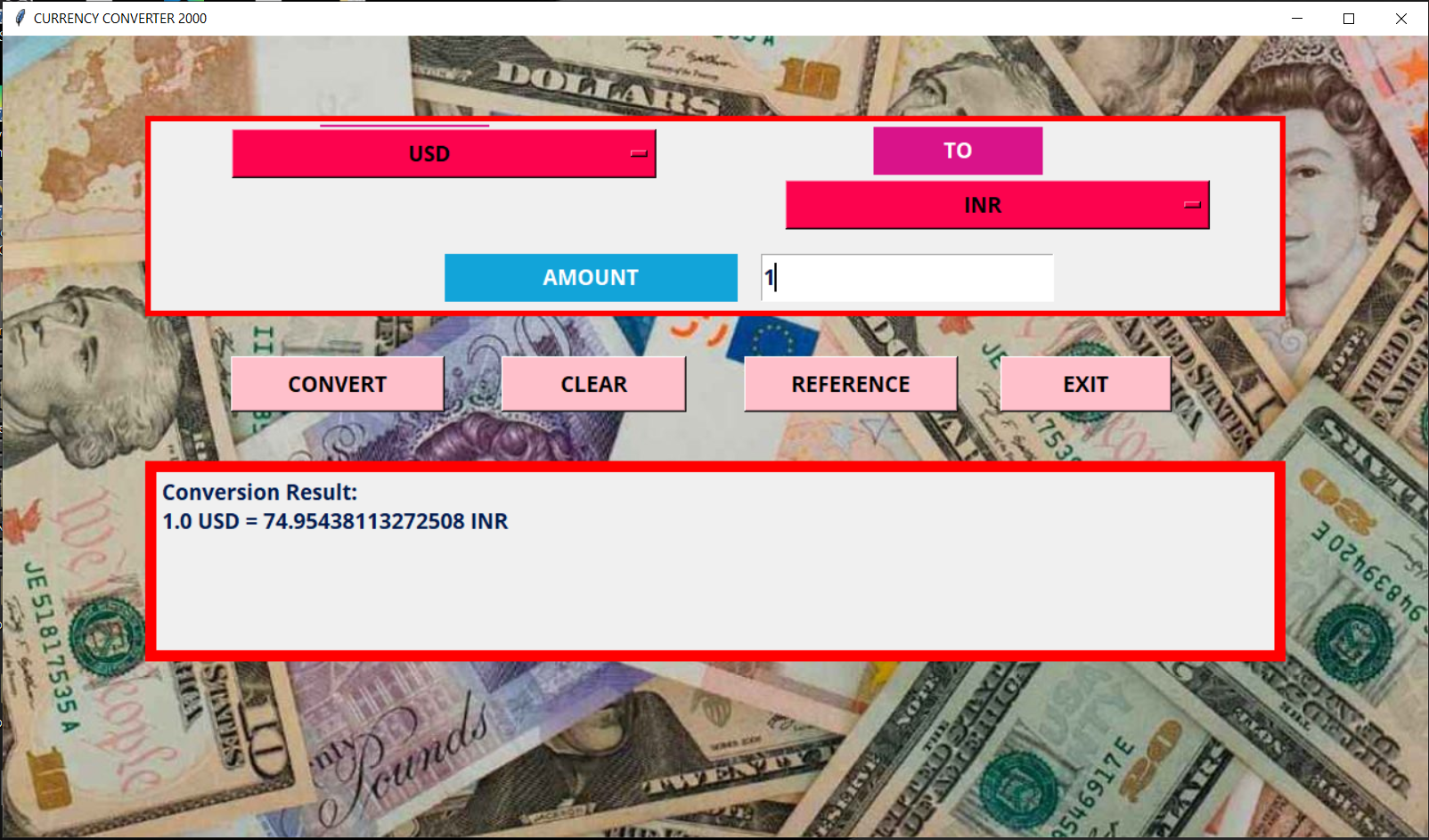
Currency Conversion
List types of currencies
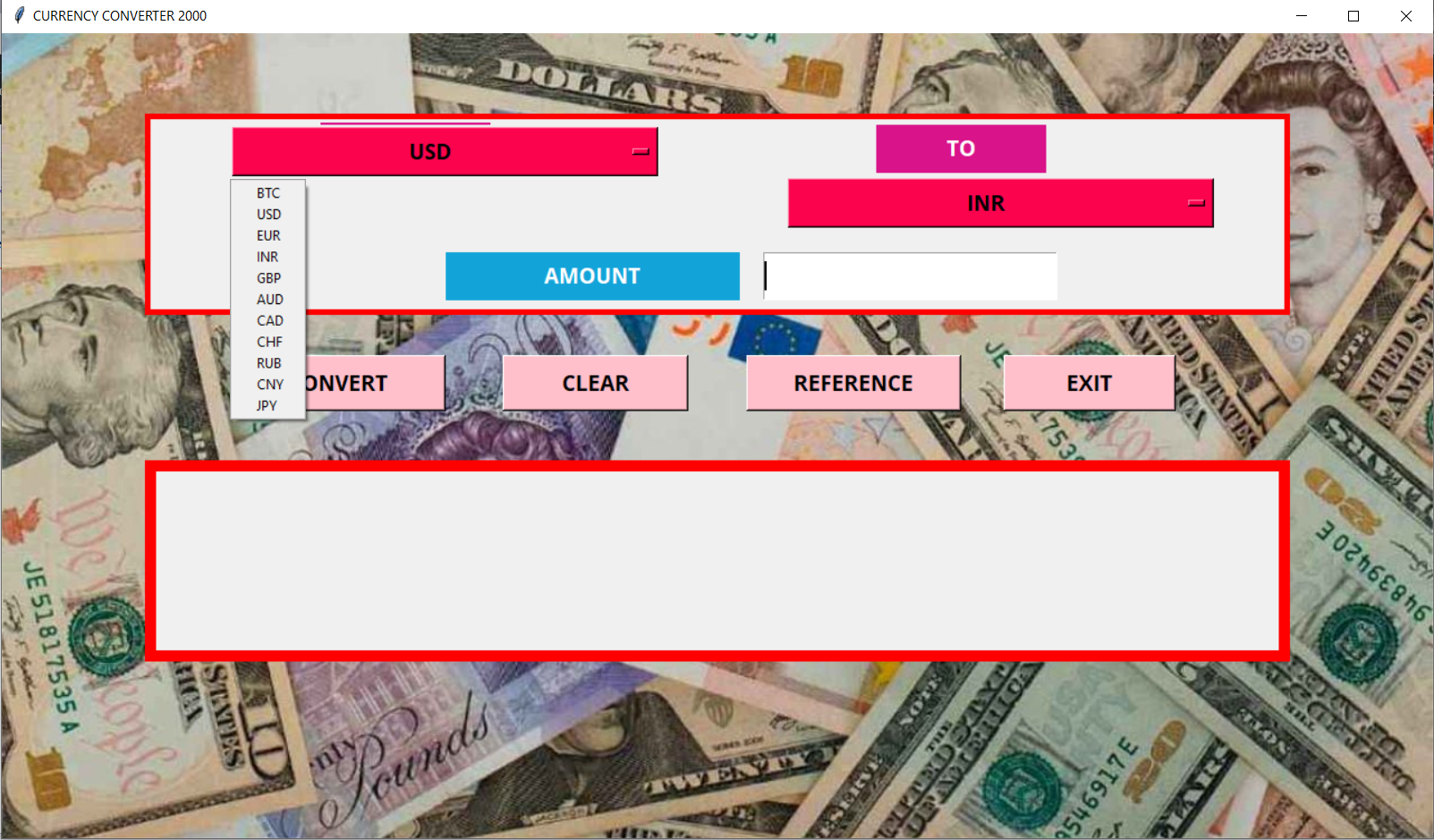
Abbreviations
BTC - Bitcoin
USD - United States Dollar
EUR - Euro
INR - Indian Rupee
GBP - British Pound Sterling
AUD - Australian dollar
CAD - Canadian dollar
CHF - Swiss Franc
RUB - Russian Ruble
CNY - Chinese Yuan
JPY - Japanese Yen
Source Code: Currency.py
from tkinter import *

from PIL import ImageTk, Image
import tkinter.font as font

root = Tk()
root.title("CURRENCY CONVERTER 2000")

root.minsize(1280,720)
root.maxsize(1280,720)
HEIGHT = 720
WIDTH = 720
FONT = font.Font(family="Open Sans",size="14", weight="bold")

canvas = Canvas(root, height=HEIGHT, width=WIDTH)
canvas.pack()

background_image = ImageTk.PhotoImage(Image.open(r"Background.jpg"))
background_label = Label(root,image=background_image)
background_label.place(relwidth=1,relheight=1)

frame = Frame(root, bg="Red", bd=5)
frame.place(relx=0.5, rely=0.1, relwidth=0.80,relheight=0.25, anchor="n")

label_up = Label(frame)
label_up.place(relwidth=1, relheight=1)

lower_frame = Frame(root, bg="red", bd=10)
lower_frame.place(relx=0.5,rely=0.53, relwidth=0.8, relheight=0.25, anchor="n")

label_down = Label(lower_frame,font=FONT, fg="#001a4d", anchor="nw",justify="left", bd=4)
label_down.place(relwidth=1,relheight=1)

label1 = Label(frame,text = "FROM", font= FONT, bd=5,bg="#d9138a", highlightbackground = "#d9138a", fg="white")
label1.place(relx=0.15, rely=0.02, relwidth = 0.15, relheight=0.25)

label2 = Label(frame, text = "TO", font =FONT, bd =5, bg ="#d9138a", highlightbackground = "#d9138a", fg = "white")
label2.place(relx = 0.64,rely = 0.03,relwidth = 0.15, relheight =0.25)

#For Options menu
options = [
    "BTC",
    "USD",
    "EUR",
    "INR",
    "GBP",
    "AUD",
    "CAD",
    "CHF",
    "RUB",
    "CNY",
    "JPY"
]

clicked1 = StringVar()
clicked1.set("Select")
listbox1 = OptionMenu(frame, clicked1, *options)
listbox1.config(bg="#fc034e", fg="black", activeforeground="#fc034e",activebackground="black", font=FONT)
listbox1.place(relx=0.07,rely=0.03,relheight=0.28,relwidth=0.38)

clicked2 = StringVar()
clicked2.set("Select")
listbox2 = OptionMenu(frame,clicked2,*options)
listbox2.config(bg="#fc034e", fg="black", activeforeground="#fc034e",activebackground="black", font=FONT)
listbox2.place(relx=0.56,rely=0.3,relheight=0.28,relwidth=0.38)

#for logo image between two options list

label3 = Label(frame, text="AMOUNT", font=FONT, bg="#12a4d9",highlightbackground="#12a4d9",fg="white")
label3.place(relx=0.26,rely=0.7,relwidth=0.26,relheight=0.25)

entry = Entry(frame,font=FONT,fg="#001a4d")
entry.place(relx=0.54,rely=0.7,relwidth=0.26,relheight=0.25)

#buttons
button1 = Button(root,text="CONVERT", font=FONT, bg="pink", fg="black", activeforeground="pink",activebackground="black")
button1.place(relx=0.16,rely=0.4,relwidth=0.15,relheight=0.07)

button2 = Button(root, text = "CLEAR", font = FONT,  bg = "pink", fg = "black", activeforeground = "pink", activebackground = "black")
button2.place(relx = 0.35,rely = 0.4,relwidth = 0.13, relheight = 0.07)

button3 = Button(root, text = "REFERENCE", font = FONT,  bg = "pink", fg = "black", activeforeground = "pink", activebackground = "black")
button3.place(relx = 0.52, rely = 0.4, relwidth = 0.15, relheight = 0.07)

button4= Button(root, text = "EXIT", font = FONT,  bg = "pink", fg = "black", activeforeground = "pink", activebackground = "black")
button4.place(relx = 0.7, rely = 0.4, relwidth = 0.12, relheight = 0.07)

#-----------THE LOGIC---------------

from tkinter import messagebox
from forex_python.converter import CurrencyRates
from forex_python.bitcoin import BtcConverter

def clear():
    entry.delete(0,END)
    label_down["text"] = ""


def convert(c1,c2,amount):
    try:
        if amount == "":
            messagebox.showerror("Error", "Amount not specified")
        elif c1 == "Select" or c2 == "Select":
            messagebox.showinfo("Error", "Currency not selected")
        else:
            try:
                amount = float(amount)
                b = BtcConverter()
                c = CurrencyRates()
                if c1 == c2:
                    result = amount
                elif c1 == "BTC":
                    result = b.convert_btc_to_cur(amount, c2)
                elif c2 == "BTC":
                    result = b.convert_to_btc(amount, c1)
                else:
                    result = c.convert(c1, c2, int(amount))
                print(result)
                label_down["text"] = f"Conversion Result: \n{amount} {c1} = {result} {c2}"
            except ValueError:
                messagebox.showerror("Error", "Invalid amount")
                clear()
    except Exception:
        messagebox.showerror("Error", "Something went wrong. Please try again")

def help():
    newwin = Tk()
    newwin.title("Reference")
    newwin.maxsize(400,300)
    newwin.minsize(400,300)
    newcanvas = Canvas(newwin, height = 400, width = 300)
    newcanvas.pack()
    newframe = Frame(newwin, bg ="yellow")
    newframe.place(relwidth = 1, relheight = 1)
    newlabel = Label(newframe, font = ("Comic Sans MS", 11, "bold"), fg ="#001a4d", anchor = "nw", justify = "left", bd =4)
    newlabel.place(relx = 0.05, rely = 0.05,relwidth = 0.90, relheight = 0.90)
    newlabel["text"] = "Abbrevations:\nBTC - Bitcoin\nUSD - USD Dollar\nEUR - Euro\nJPY - Japnese Yen\nGBP - Pound Sterling\nAUD - Australian Dollar\nCAD - Canadian Dollar\nCHF - Swiss Frank\nINR - Indian Rupees\nRUB - Russian Rubble\nCNY - Chinese Yuan"
    newbutton = Button(newframe, text = "Back",font = ("Comic Sans MS", 11, "bold"),  bg = "pink", fg = "black", activeforeground = "pink", activebackground = "black", command = lambda:newwin.destroy())
    newbutton.place(relx = 0.76, rely = 0.82, relwidth = 0.14, relheight = 0.11)
    newwin.mainloop()

def exit():
    root.destroy()


button1["command"] =lambda:convert(clicked1.get(), clicked2.get(), entry.get())
button2["command"] = clear
button3["command"] = help
button4["command"] = exit

root.mainloop()